在數秒內將你的想法變成精緻視覺作品 — 免費試用 Free GPT Image 2,用簡單的文字提示生成高品質 AI 圖片,且不會拖慢你的創作流程。
為你的圖片加入俏皮編輯、創意特效與新鮮視覺風格 — 免費試用 Free Nano Banana AI,讓每張照片都更有趣、更值得分享。
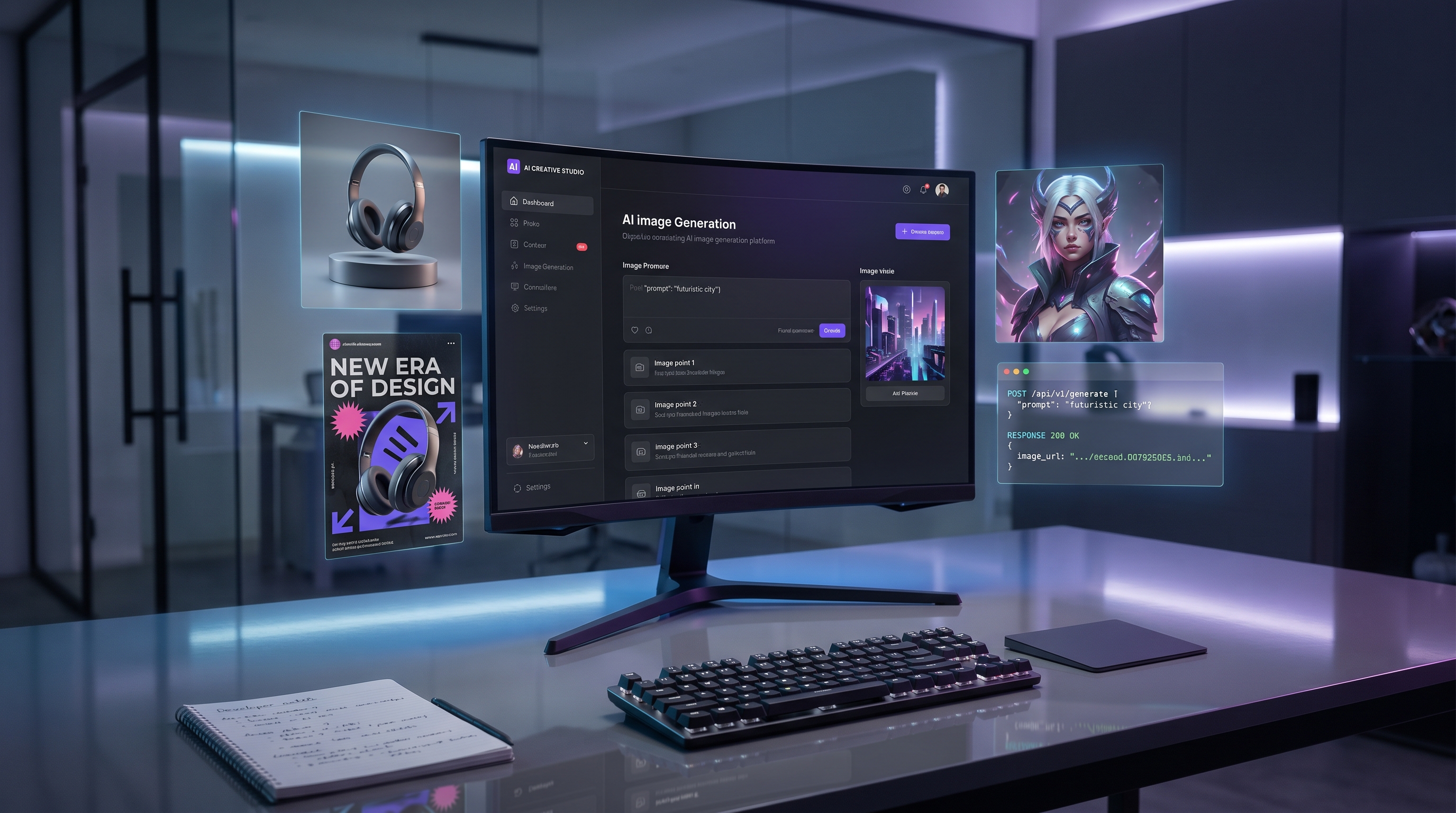
當團隊希望把圖片提示轉化為可重複使用的創意工作流程時,GPT Image 2 API 就很實用:活動視覺、產品圖片、社群媒體圖像、縮圖、海報、品牌素材、UI 視覺與創意原型。在 Flaq AI 上,創作者可以在瀏覽器中測試提示詞,開發者則能把成功的提示移到 API 式生成流程中,讓它同時適用於實驗與量產規劃。

目前來源說明:本指南使用 2026 年 5 月 28 日檢視的公開可見 Flaq AI 頁面,以及 OpenAI 官方圖片 API 文件作為一般產品注意事項參考。API 可用性、定價、點數成本、輸出品質、支援尺寸、商用條款、隱私設定與模型行為都可能變更。在建立正式生產工作流程之前,請先確認 Flaq AI 最新文件、計費與使用條款。
快速摘要:GPT Image 2 API 適合用來做什麼
當圖片提示需要成為可重複使用的創意資產,而不是一次性的實驗時,GPT Image 2 最有價值。在 Flaq AI 上,GPT Image 2 模型頁面主打文字轉圖片生成,提供提示詞、品質、比例與解析度控制,並有建立任務與輪詢結果的 API 流程。因此它與開發者、行銷人員、設計師、電商團隊與 AI 工具開發者都高度相關。
將 GPT Image 2 用於以提示詞為核心的創意工作,例如產品主視覺、社群廣告、YouTube 縮圖、App Store 圖片、海報、品牌情緒板(mood board)、電商樣機、活動概念與 UI 風格視覺。當工作流程是從一張或多張圖片開始,目標是圖片到圖片的編輯、背景替換、參考圖導向的變更、物件精修或風格一致性時,請使用 GPT Image 2 Edit API。
推薦 Flaq AI 的實用原因在於它在同一個地方提供兩條有用路徑:透過 Free GPT Image 2 進行瀏覽器端測試,以及透過模型頁面與 Flaq AI docs 取得 API 存取。先在瀏覽器測試,保存有效的提示詞,然後只整合那些穩定到足以用於生產的工作流程。

GPT Image 2 API vs GPT Image 2 Edit API
當輸入主要是文字時,使用圖片生成 API。當輸入包含需要被保留、變更、融合或精修的既有圖片時,使用編輯 API。這個區分很重要,因為最佳提示詞結構會依模型是在「從零創造整個場景」或「修改特定素材」而改變。
GTP Image 2 圖片生成 API 最適合:
- 依活動簡報進行文字轉圖片生成。
- 社群媒體圖像與海報概念。
- 虛構或通用產品的產品主視覺圖片。
- 品牌情緒板與創意原型設計。
- 縮圖、App 視覺與 SaaS 風格構圖。
GPT Image 2 圖片編輯 API 最適合:
- 編輯上傳的產品照片。
- 在保留產品形狀的前提下替換背景。
- 精修光線、陰影、材質與構圖。
- 結合多個參考以維持風格或版面一致。
- 以既有素材建立可量產的圖片變體。
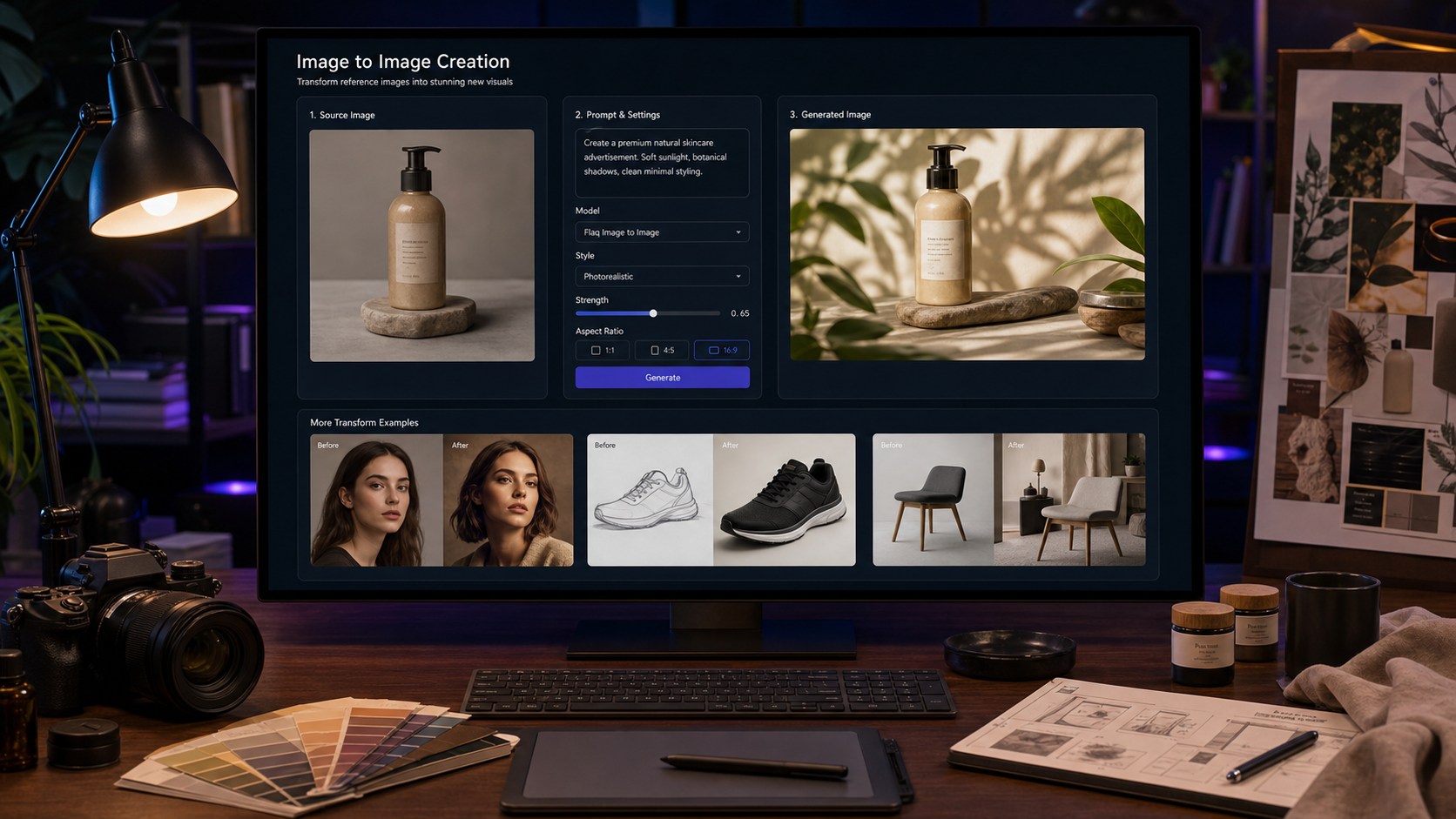
在 Flaq AI 上,編輯模型頁面明確支援圖片上傳,且 API 範例中支援 image_url_list;而生成頁面則以提示詞輸出為核心。若你不是用 Flaq,而是直接使用 OpenAI API,請查閱 OpenAI 最新圖片 API 文件,因為端點名稱、模型名稱、參數與支援的圖片功能可能與 Flaq 的抽象層不同。

開發者工作流程:從提示測試到 API 整合
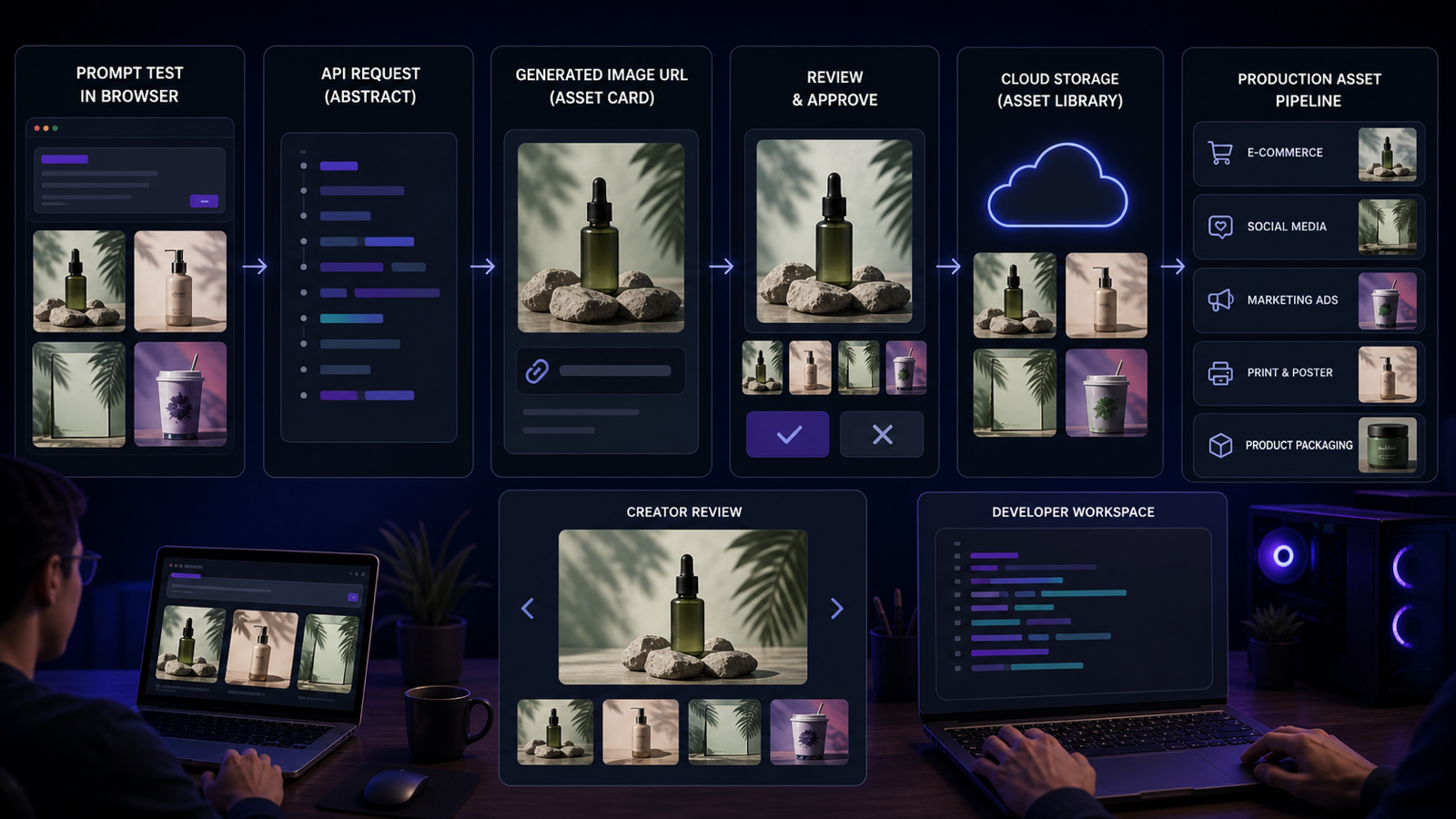
最安全的開發者流程是先視覺測試再整合。圖片 API 可能在技術上可用,但仍可能無法達到你的應用所需的特定創意標準。先用瀏覽器測試,再把穩定的提示詞搬進 API 呼叫。
使用以下流程:
- 選擇模型:文字轉圖片用 GPT Image 2,圖片到圖片編輯用 GPT Image 2 Edit。
- 在 Flaq AI 的瀏覽器工作流程中測試提示詞。
- 依平台設定長寬比、輸出尺寸與品質:社群廣告用正方形、海報用直式、網站主視覺用寬幅。
- 生成或編輯圖片。
- 檢查產品準確性、風格、版面、文字表現、瑕疵(artifacts)與商用適配性。
- 保存提示詞、輸入圖片、參數與輸出備註。
- 依 Flaq 文件與模型範例,將穩定流程移到 API。
- 加入生產檢查:重試、錯誤處理、審核(moderation)、儲存、審稿佇列與成本追蹤。
在生產環境中,把提示詞文字當作應用邏輯:要版本控管、測試,並在影像對使用者端流程很關鍵時,準備後備提示或後備模型。對電商或廣告來說,發布生成素材前也應保留人工審核步驟。

可重複使用的文字轉圖片提示公式
強而有力的 GPT Image 2 提示詞讀起來像精簡的創意簡報。它會描述素材、使用情境、主體、場景、風格、構圖、光線、色盤、文字需求與限制條件。這讓輸出更容易評估,也更容易透過 API 重現。
複製這個公式:
Create a high-quality [image type] for [use case]. Subject: [main subject]. Setting: [background/environment]. Style: [photorealistic/editorial/product ad/SaaS/3D/render/poster/social media]. Composition: [close-up/centered/wide/vertical/square/hero layout]. Lighting: [soft studio/natural/cinematic/neon/warm]. Color palette: [colors]. Text requirements: [exact text or no readable text]. Constraints: [avoid logos, celebrity faces, copyrighted characters, clutter, fake claims]. Output should be clean, commercially usable, and suitable for [platform].
對行銷與產品視覺而言,請對文字要求具體說明。若最終文案必須完全正確,通常更安全的做法是要求「不要出現可辨識文字」,再在設計工具中後製加入排版。若確實需要文字,請保持精短、手動核對,並且不要在受管制或對產品敏感的類別中依賴模型生成的宣稱。

可重複使用的圖片編輯提示公式
編輯提示詞應明確說明要改什麼、要保留什麼。圖片編輯最常見的失敗,是一邊要求「更好看」,卻不小心改動了必須固定的產品、人物、版面、顏色或材質。
複製這個公式:
Edit the uploaded image to [main change]. Preserve [identity/product shape/layout/colors/materials]. Change only [target area]. Improve [lighting/background/composition/texture/sharpness]. Style: [photorealistic/product ad/editorial/e-commerce/social]. Avoid changing [important elements]. Keep the result natural, consistent, and commercially usable.
對 GPT Image 2 多圖編輯 API 而言,在你自己的工作流程中,送出前請清楚標記每張參考圖的角色,例如:產品圖、背景參考、光線參考、版面參考與風格參考。你在內部對素材角色定義得越清楚,之後越容易除錯與回溯結果。

14 個可直接複製使用的 GPT Image 2 提示範例
先把這些提示當作瀏覽器測試,再移到 API 工作流程。第一次測試先保持簡單,只有在輸出以某種方式失敗時,才逐步加上限制條件。
1. 保養精華產品主視覺
Create a photorealistic product hero image for a skincare serum. The bottle is centered on a marble bathroom counter with soft morning light, subtle water droplets, warm neutral background, premium beauty ad mood, clean negative space, no readable brand text.
2. 咖啡訂閱盒社群廣告
Create a square social media ad for a coffee subscription box. Show a coffee package, cup of hot coffee, roasted beans, and warm morning sunlight on a wooden table. Cozy lifestyle photography, clean composition, empty space for headline text, no real logos.
3. 生產力 App 海報
Create a vertical 9:16 poster for a productivity app. Show a clean desk, laptop, notebook, floating abstract task cards, blue-white tech lighting, modern SaaS mood, professional composition, no readable fake UI text.
4. 旅行背包商品列表圖
Create an e-commerce product image of a travel backpack on a clean white background. Show zipper details, side pocket, laptop compartment, durable fabric texture, centered composition, sharp product lighting, realistic shadows.
5. 時尚型錄 Lookbook 圖片
Create a premium fashion lookbook image of a model wearing a minimalist beige coat in a clean studio. Editorial lighting, realistic fabric texture, soft shadows, elegant neutral palette, no celebrity likeness, no brand logos.
6. AI 圖片 API YouTube 縮圖
Create a YouTube thumbnail concept about AI image APIs. Show a developer laptop, API code-like abstract panels, image preview cards, and a large clean title area. High-contrast tech style, blue-purple lighting, no tiny unreadable text.
7. 健康品牌情緒板
Create a brand mood board for a modern wellness company. Include color swatches, packaging mockups, abstract botanical textures, clean typography placeholders without readable brand names, soft green and cream palette, premium editorial layout.
8. 無線耳機新品發表海報
Create a product launch poster for wireless earbuds. Earbuds float above a reflective surface, soft blue rim lighting, clean black background, premium tech commercial style, empty space for headline, no readable brand text.
9. 抹茶拿鐵美食照
Create a realistic food photography image of matcha latte over ice. Bright natural kitchen light, condensation on glass, cookies on a ceramic plate, clean tabletop styling, refreshing summer mood, high-end lifestyle photo.
10. AI 寫作工具 App Store 主視覺
Create an app store hero image for an AI writing tool. Show a laptop with abstract writing cards, organized notes, soft office lighting, clean SaaS workspace, professional and trustworthy mood, no readable UI text.
11. 產品照轉棚拍廣告
Edit the uploaded product photo into a premium studio product ad. Preserve the exact product shape, color, label placement, and packaging design. Replace the background with a soft gradient studio setup, improve lighting, add realistic shadows, and keep the image photorealistic.
12. 人像轉編輯風格檔案照
Edit the uploaded portrait into a professional editorial profile image. Preserve the person's identity, face shape, hairstyle, and expression. Improve lighting, replace the background with a neutral studio backdrop, keep skin texture natural, no glamour distortion.
13. 服飾型錄清理
Edit the uploaded clothing product image into a clean e-commerce catalog photo. Preserve the garment shape, fabric, color, and stitching. Remove background clutter, place on a light neutral background, improve folds and texture clarity.
14. 保養品多圖活動企劃
Create a multi-image campaign concept for a skincare brand: product hero image, bathroom lifestyle image, texture close-up, and social ad layout. Keep the same bottle design, color palette, lighting direction, and premium beauty style across all images.
在 API 工作流程中,請把每個提示詞與其目標比例、品質、輸入圖片與審核結果一併保存。適用於正方形社群廣告的提示,可能需要調整才能適用於寬幅網站主視覺或直式海報。

面向開發者、行銷、設計師與電商團隊的使用情境
當視覺生成需要銜接到真實工作流程時,GPT Image 2 會很有價值。開發者可能更在意 API 可靠性、payload 設計、任務輪詢、錯誤處理與儲存;行銷在意品牌契合度、廣告格式、活動一致性與審核速度;設計師在意構圖、留白給排版、視覺層級與可編輯性;電商團隊在意產品準確度、背景可控性與輸出一致性。
使用文字轉圖片生成來做前期概念與全新素材:
- 活動概念與情緒板。
- 社群媒體圖像與海報。
- YouTube 縮圖與 App Store 主視覺。
- 通用的產品廣告視覺。
- 網站主視覺圖片與部落格封面。
使用圖片編輯來精修生產素材:
- 產品照片清理。
- 背景替換。
- 人像打光改善。
- 服飾型錄清理。
- 多圖活動一致性。
「瀏覽器到 API」的路徑特別適合同時需要創意迭代與工程控管的團隊:行銷人員可以先手動確認視覺方向,接著開發者把穩定提示整合到內容工具、創意自動化系統或內部儀表板。

品質、比例、隱私、成本與生產檢查
在進入生產之前,請不要把圖片 API 工作流程直接上線,除非它已通過審核清單。API 可用性、定價、點數成本、輸出品質、支援尺寸、隱私設定與模型行為都可能變更,且生成圖片仍可能出現視覺錯誤。
上線前請檢查:
- Flaq AI 目前模型可用性與文件。
- 目前計費、點數與使用條款。
- 支援的比例、寬度、高度與品質設定。
- 公開/私密輸出行為是否符合你的使用情境。
- 生成圖片品質是否足以支援該平台。
- 產品宣稱、包裝、文字與版面是否正確。
- 上傳素材是否具備可編輯授權。
- 輸出是否避免受版權保護的角色、真實商標、名人相貌與未授權品牌素材。
- 發布或交付給客戶前是否需要人工審核。
商用圖片請在流程中建立審核層。生成圖片可能很漂亮,但只要改動了產品、暗示不實宣稱,或包含未授權的視覺元素,就可能無法使用。

GPT Image 2 與 Flaq AI 工作流程的推薦文章
當你想對圖片模型、Flaq API 與相鄰的影片 API 工作流程有更完整的脈絡時,請參考以下相關文章。
相關文章:
- ChatGPT Image 2 Is Here: A Practical Review of OpenAI's New Image Model and API Access
- Nano Banana 2 API Guide: How to Use Flaq AI for Fast Image Workflows
- Flaq AI Video Models Review: Which Video API Should You Use?
- Kling 3 API Guide: Standard vs Pro, Pricing, and How to Use It on Flaq AI
- Seedance 2.0 API Guide: How to Use Flaq AI for Faster Text-to-Video Workflows
- VEO 3.1 Text-to-Video API on Flaq AI: Features, Pricing, and How to Use It
人們也會閱讀:
- ChatGPT Image 2 Turns Prompts Into Pipelines: What's New and Where to Access the API
- GPT Image 2 Fashion Guide: Build Lookbooks, Outfit Concepts, Product Photos, and Virtual Try-On Visuals
- How to Build a Brand Kit with ChatGPT Image 2?
- GPT Image 2 OpenAI API: What It Offers and How to Try It
- ChatGPT Image 2 Release: Features, Prompts, and API Guide
- ChatGPT Image 2 vs Seedream 5: Which AI Image Model Should You Use?
- GPT Image 2 Prompt Playbook: Build Posters, Anime Assets, Wallpapers, and 3D Character Concepts Faster
- GPT Image 2 Explained: What's New and How It Compares With Nano Banana Pro
對生產團隊而言,把閱讀與實作測試結合起來最有效。文件與範例能提供幫助,但最可靠的指南仍是模型在你自己的產品、品牌素材、比例與審核標準下的表現。

FAQ:GPT Image 2 API、Flaq AI 與圖片編輯
GPT Image 2 API 有什麼用途?
GPT Image 2 API 適用於文字轉圖片工作流程,例如產品圖片、社群媒體圖像、縮圖、海報、品牌素材、UI 視覺、電商樣機與創意原型設計。在 Flaq AI 上可先進行視覺測試,再整合到 API。
GPT Image 2 Edit API 是什麼?
GPT Image 2 Edit API 用於圖片到圖片的編輯工作流程。當你需要編輯上傳圖片、保留產品或身份細節、替換背景、精修物件、融合參考,或建立一致的生產變體時,就使用它。
我可以在使用 API 之前先線上試用 GPT Image 2 嗎?
可以。Flaq AI 提供 Free GPT Image 2 的瀏覽器測試流程。先用它驗證提示詞結構、比例、風格與品質,再整合 API 呼叫。
在 GPT Image 2 提示詞中應該使用精確文字嗎?
只有在你能手動驗證結果時才使用精確文字。對廣告、縮圖、海報與 UI 視覺而言,通常更安全的做法是要求不要出現可辨識文字或保留空白標題區,再在設計工具中加入最終文案。
商用團隊應該避免什麼?
避免受版權保護的角色、真實商標、名人相貌、誤導性的產品宣稱、未授權品牌素材與權利不清的內容。此外,正式使用前也請確認 Flaq AI 最新使用條款、隱私設定、計費與模型行為。

結論:把 GPT Image 2 工作流程當作創意系統來建立
最好的 GPT Image 2 API 工作流程是一套創意系統:先在瀏覽器測試提示詞、記錄有效做法、選擇生成或編輯、設定比例與品質、審核輸出,然後只有在流程足夠穩定時才透過 API 整合。這能讓實驗更快、量產更安全。
當你想要在同一套流程中同時擁有瀏覽器端 GPT Image 2 測試與 API 存取時,請使用 Flaq AI 。從上方的提示公式與範例開始,核對最新文件與計費,並在商用圖片上保留人工審核機制。