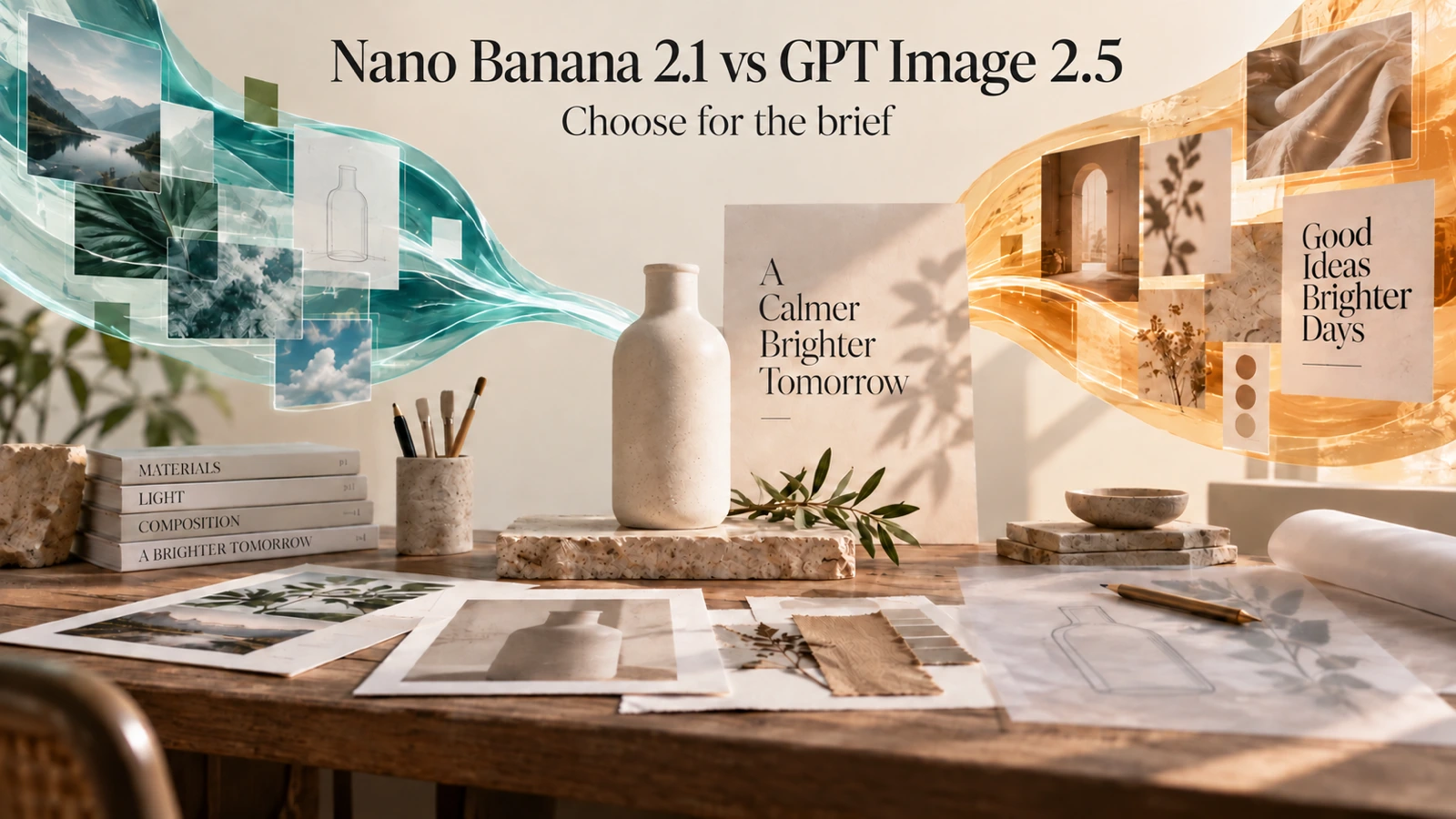
Nano Banana 2.1 vs GPT Image 2.5: Quality, Use Cases, and Which Fits Your Workflow
The Nano Banana 2.1 vs GPT Image 2.5 decision starts with your next image: a poster with exact wording, a product photo that needs a new background, or a batch of campaign concepts. Nano Banana 2.1 offers search controls and a wider range of formats on Flaq AI. GPT Image 2.5 Flare offers adjustable quality settings and lower-priced draft options. The useful choice depends on which of those differences helps you finish your brief.
This comparison covers image generation, text rendering, prompt adherence, editing, and practical costs, using published model and platform documentation. All Flaq AI specifications and prices for GPT Image 2.5 below refer specifically to ChatGPT Images 2.5 Flare or Flare Edit. Information was checked on October 12, 2026.
Quick answer: should you try Nano Banana 2.1 first?
- Search context or unusually wide and tall images: shortlist Nano Banana 2.1 for its optional search controls and broader aspect-ratio choices.
- Low-cost concept batches: shortlist GPT Image 2.5 Flare using a low or medium quality setting, then check whether the result meets your needs.
- Reference-heavy editing: compare the full editing bill; Nano Banana has a lower listed reference surcharge, while Flare supports up to 16 inputs.
- Exact text or product fidelity: test both with the same brief. Neither a feature list nor a quality setting proves which will preserve your particular details better.
Nano Banana 2.1 vs GPT Image 2.5 at a glance
Flaq AI offers GPT Image 2.5 through Client, Flare, and Sunburst, each with a separate image-editing model. Alongside the Flare options covered below, creators can access Sunburst for text-to-image generation and Sunburst Edit for reference-based editing.
The table below compares the documented Flaq AI interfaces, rather than assigning unmeasured quality scores.
| Decision point | Nano Banana 2.1 / Edit | ChatGPT Images 2.5 Flare / Edit |
|---|---|---|
| Starting point | Text generation or a separate editing model | Text generation or a separate editing model |
| Output resolution | 1K, 2K, 4K | 1K, 2K, 4K |
| Aspect-ratio choices | 14, including 1:8 and 8:1 | 10, including 16:9 and 21:9 |
| Separate quality setting | Not exposed in the documented request | Adjustable quality; medium is the default |
| Reference images for editing | 1–14 | 1–16 |
| Search controls | Optional web search and image search | Neither is listed in the documented Flare request |
| Practical reason to shortlist | Search context, extreme formats, multi-image editing costs | Adjustable quality budgets, inexpensive drafts, up to 16 references |
Sources: Flaq AI's Nano Banana 2.1 API documentation and ChatGPT Images 2.5 API documentation. Provider features are not automatically available through every third-party interface.
Nano Banana 2.1 image generation: compare useful detail and composition
Both models are credible candidates for product scenes, social graphics, and campaign concepts, but their documented positioning differs. Google describes Nano Banana 2.1 as an efficiency-focused update with improvements to realism, instruction following, text, and character consistency over Nano Banana 2. Those are improvements within Google's family, not evidence that it beats Flare. Google's model documentation is the source for that positioning.
OpenAI positions GPT Image 2.5 Flare for fast, high-quality everyday generation. On Flaq AI, its quality control gives teams another way to adjust spending alongside resolution.
For a product campaign, compare the bottle's geometry, believable reflections, lighting, and space for the headline. An attractive scene still fails if it changes the product shape. For editorial art, visual coherence and composition may matter more than exact object preservation. Choose the output that meets the brief at its final display size; resolution alone cannot answer that question.
The product scene below shows two creative directions for one brief: an amber perfume bottle, black volcanic rock, a coiled serpent, smoke, and warm lighting. The matching prompt is included near the end of this article.
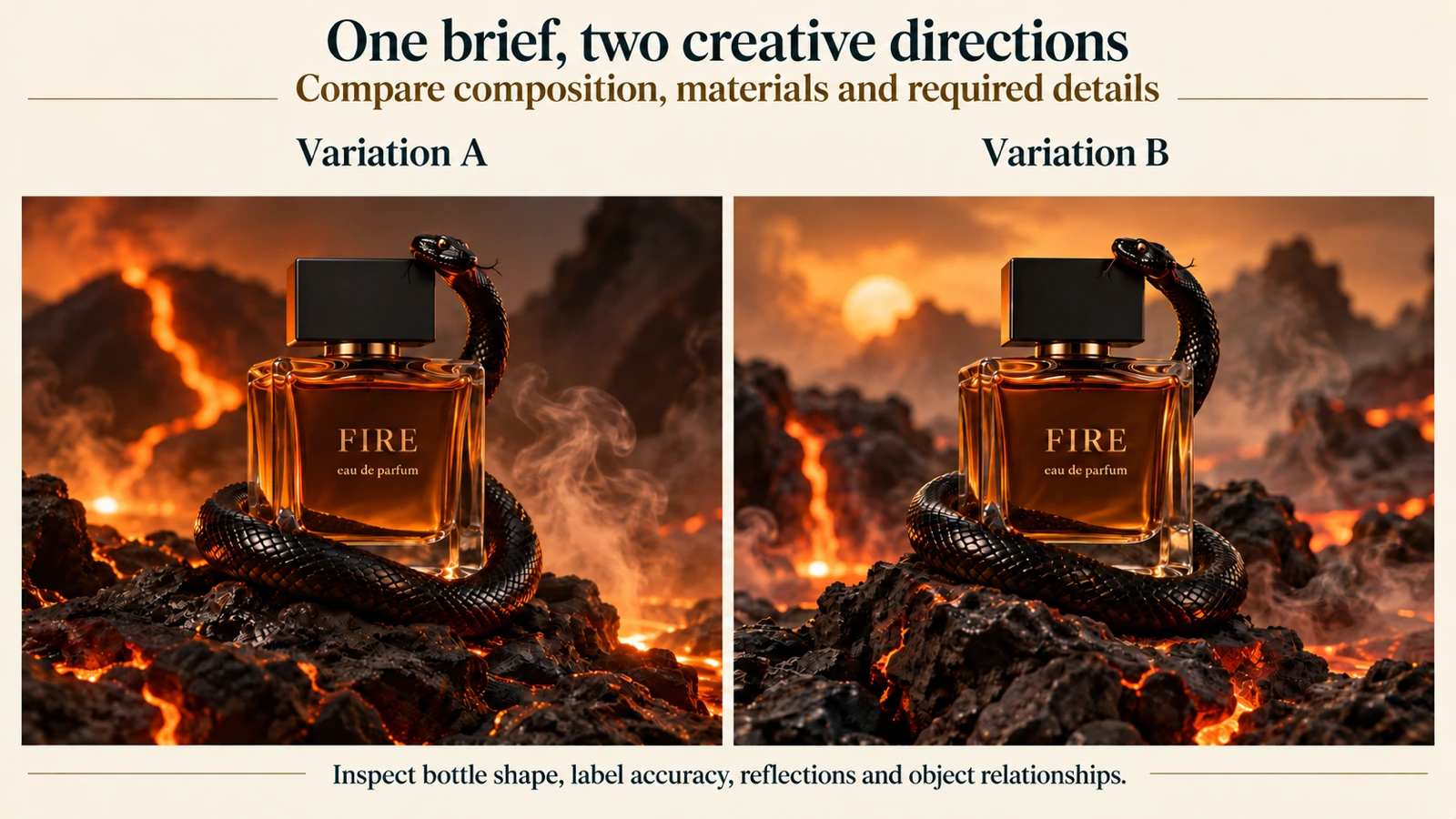
Compare the bottle shape, label accuracy, reflections, and relationship between the bottle and serpent before judging the overall mood.
When you run this brief yourself, inspect the glass, liquid, label text, snake anatomy, and object relationships separately. Differences in smoke or background arrangement may be acceptable creative variations; missing objects or incorrect label text change whether the image meets the brief.
Nano Banana 2.1 text rendering and prompt adherence: judge them separately
Accurate spelling and accurate instruction following are different requirements. An image can reproduce a headline correctly while adding an unwanted slogan, moving a product, or ignoring the requested number of objects.
Nano Banana 2.1's documentation explicitly highlights improved text and infographic layouts. OpenAI's prompting guide includes Flare examples for text-bearing designs and recommends specifying exact wording, position, and exclusions. These sources establish relevant capabilities, but they do not provide a controlled Nano Banana 2.1 versus Flare accuracy ranking. Google model details, OpenAI prompting guidance.
Use the same concrete brief for each candidate:
Create a square promotional poster for a ceramic studio. Show exactly three blue cups on a cream shelf. Place the headline "Make room for calm" at the top and "Saturday, 10 AM" at the bottom. Use no other words, logos, or labels.
Check the wording, cup count, color, placement, and absence of extra text independently. For multilingual graphics, have a fluent reader inspect the result. Short headlines and dense informational layouts should also be evaluated separately: passing one does not establish reliability on the other.
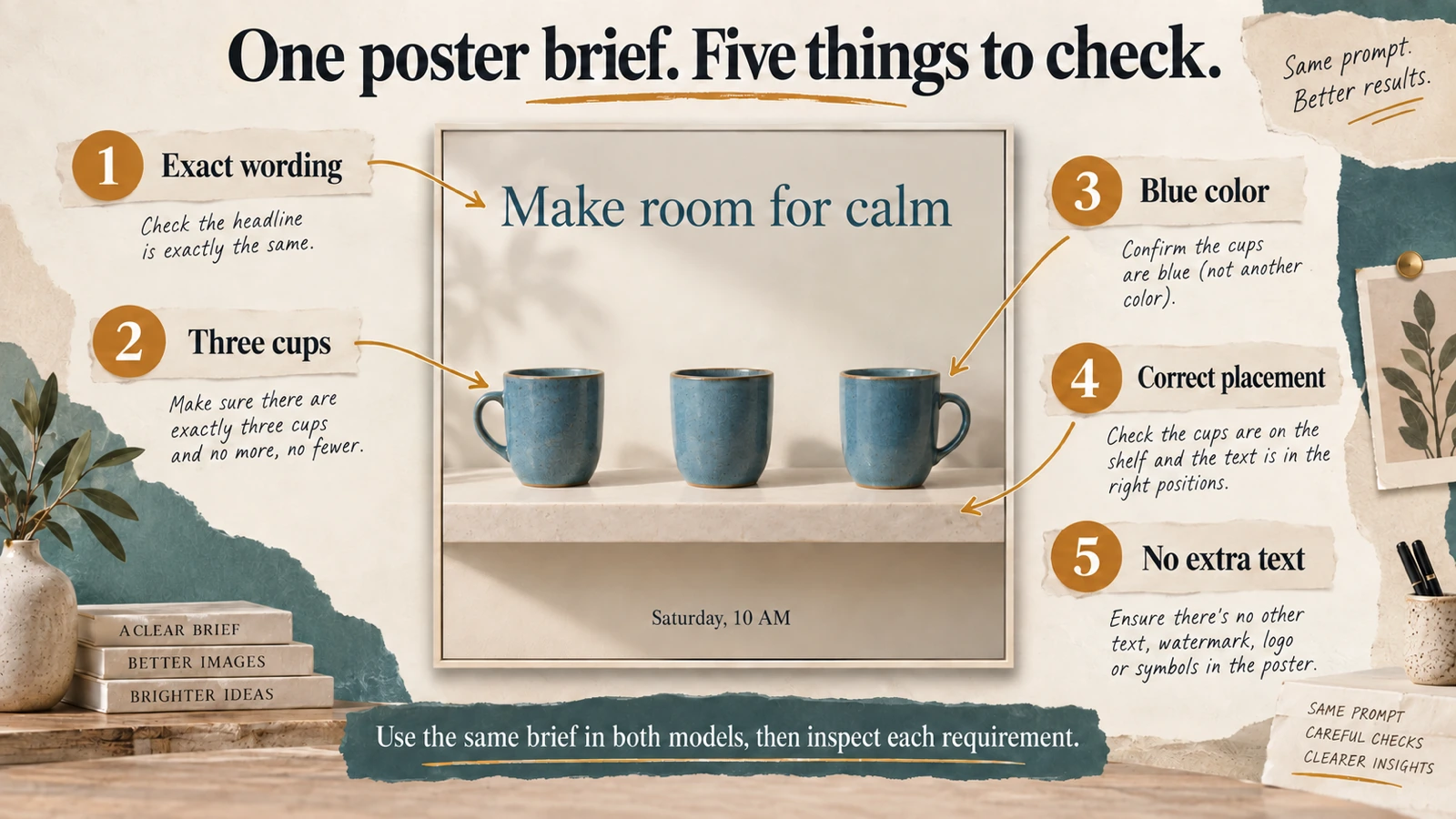
Read the headline, count the cups, check the color and placement, and look for unwanted text. Evaluate each requirement separately when trying the same brief in both models.
For a first comparison, open Nano Banana 2.1 and GPT Image 2.5 Flare, paste this prompt, and select the same square output resolution. Record Flare's quality setting. Use your own headline afterward to check whether the model suits the content you actually publish.
Image editing with Nano Banana 2.1: preservation, references, and search context
The clearest editing differences are the available inputs and controls. Nano Banana 2.1 Edit accepts up to 14 reference images and offers optional web and image search. That makes it worth evaluating when a brief needs visual references or contextual information. Search results still need checking for relevance and accuracy.
ChatGPT Images 2.5 Flare Edit accepts up to 16 references and provides adjustable quality settings for editing. A higher input limit can help with a larger reference set, but it does not prove stronger identity preservation or better compositing.
For a product edit, the practical question is whether you can change the scene without changing what you sell. Use the same source image in both Edit pages and give one narrow instruction:
Replace the plain background with a warm stone pedestal, soft window light, and subtle foliage shadows. Preserve the bottle silhouette, cap, color, and camera angle. Do not add text or a logo.
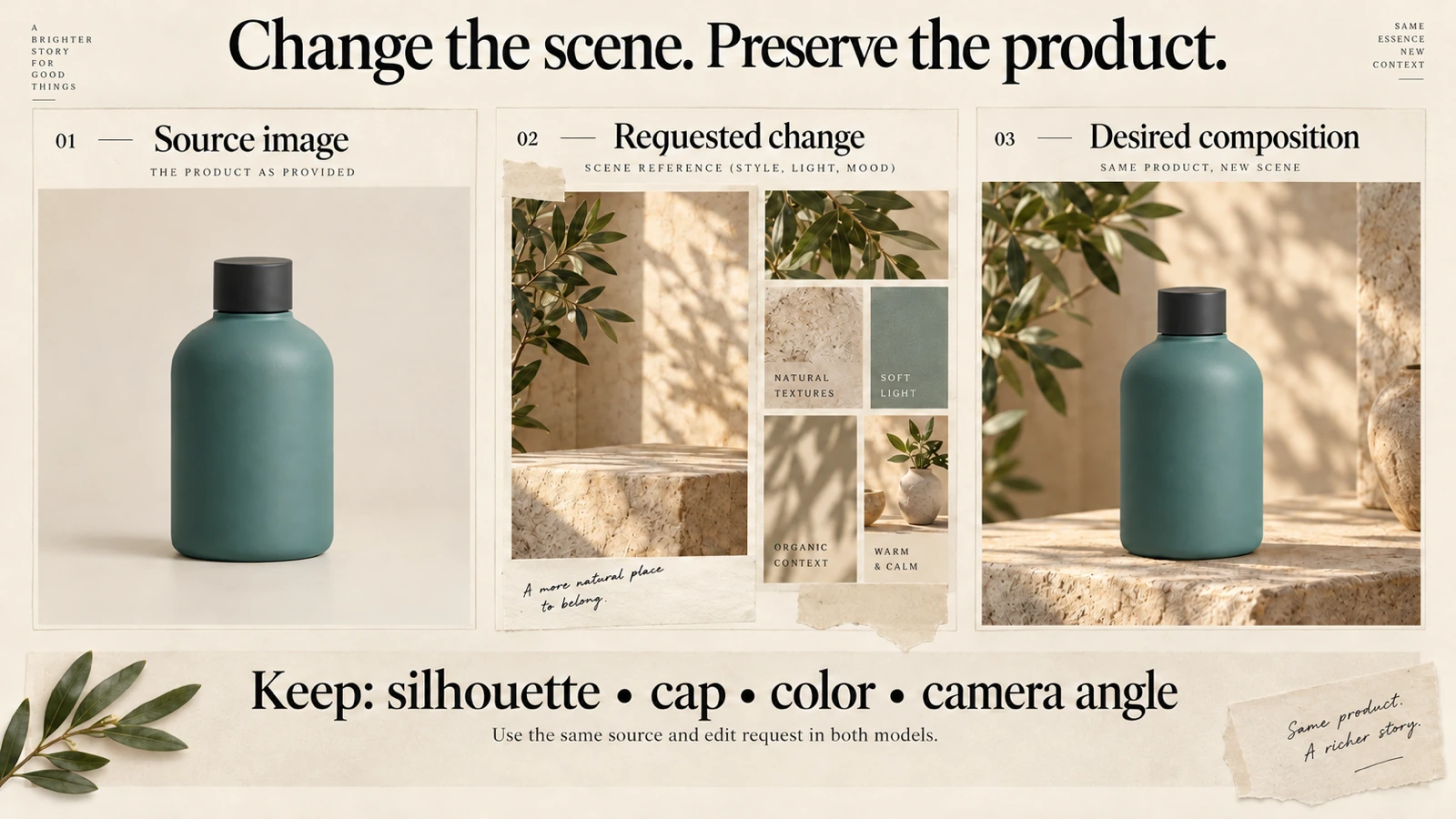
Define the source, the desired scene, and the product details that must stay consistent: silhouette, cap, color, and camera angle.
Check the silhouette, cap, color, and angle before accepting the edit. If your real product has a label or logo, add its preservation to the prompt and inspect it separately. Keep the approved original available for final compositing when details must remain exact.
Which model should you choose for your workflow?
Think about the finished asset your business needs: a product photo that helps shoppers picture a daily routine, a social ad that gives a new drink a distinctive identity, or a workshop poster that makes the experience inviting. Each scenario starts with different source material and asks the model to solve a different creative problem.
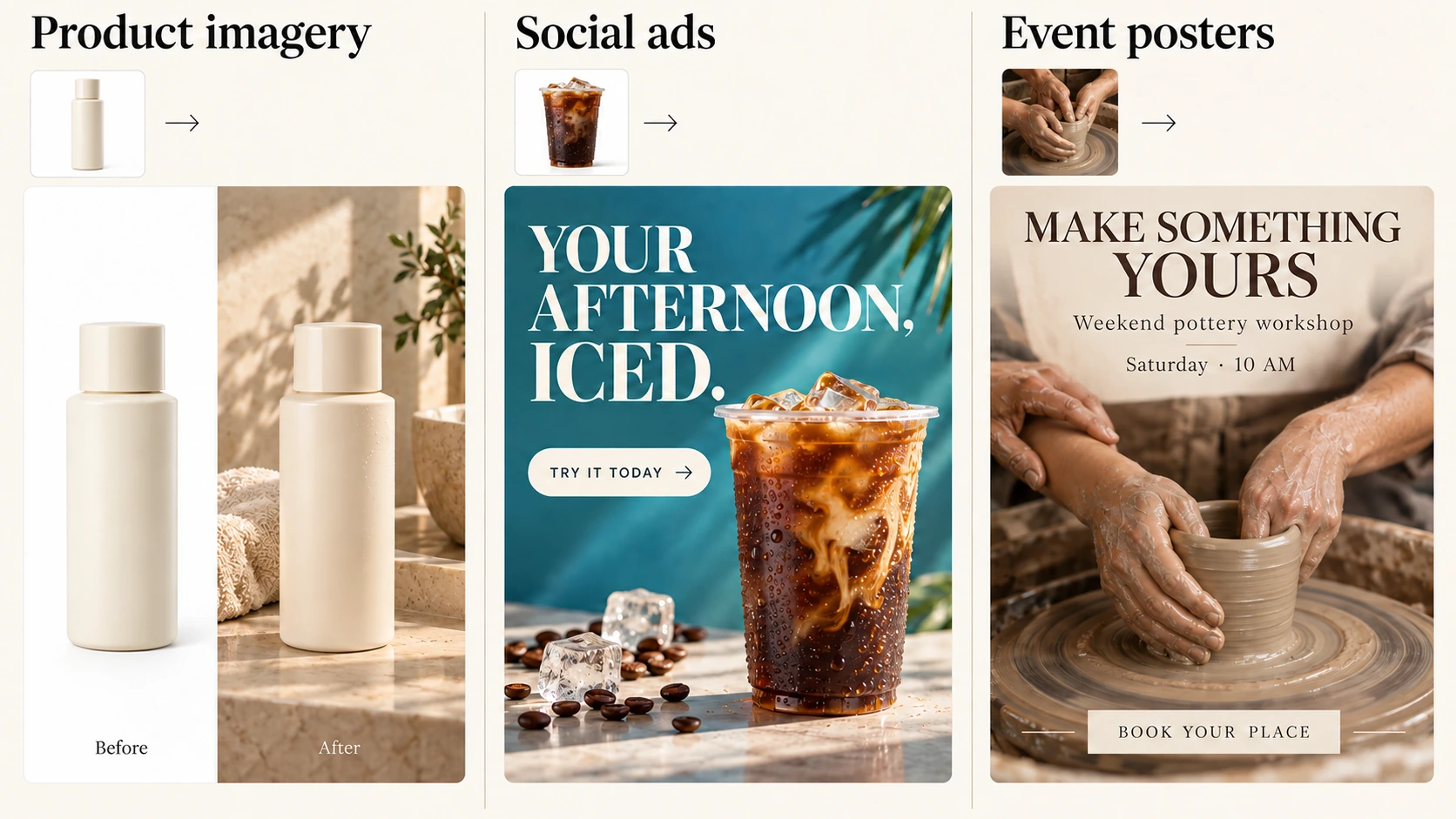
E-commerce product photos: change the setting, preserve the product
A skincare store has a white-background photograph of its serum bottle and needs a lifestyle visual for a launch. Place that same bottle on a sunlit bathroom vanity with a soft towel and warm stone textures. The white-background image makes the product easy to inspect; the lifestyle version helps shoppers imagine it in their morning routine. Together, they give the product page both a clear view of the item and a sense of how it fits into everyday life.
Start with the approved product photograph and a label close-up. Ask for the setting and lighting to change while preserving the bottle shape, cap, packaging color, and printed wording. A side-by-side view of the original and the new scene makes the transformation easy to assess. Once the direction is approved, related backgrounds can support a launch email or seasonal promotion without changing the product's identity.
Use the editing models for this task. Nano Banana 2.1 Edit is worth trying when the brief also needs search context for the surrounding scene. Flare Edit offers a separate quality control for exploring and refining that scene. If you already have all the references you need, search is not a reason on its own to choose Nano Banana; neither control establishes which model will preserve your packaging better.
Inspect the label, cap edges, proportions, and contact shadow against the original. Choose the result that brings the product into a convincing setting with fewer product corrections. If neither preserves essential details, keep the original product cutout and use the generated setting as a background.
Social ad creatives: turn one campaign idea into several placements
A cafe launching an iced coffee needs more than a photograph of a cup. It needs an ad that makes the drink feel refreshing and gives people a reason to notice the launch. Start with a drink photo, the cafe's colors, and approved campaign copy. Build a design around the coffee: visible ice and condensation, a contrasting background, a short headline, and a clear invitation to try it. The deliverable is a finished promotional layout for the feed, with a related story or banner version when needed.
Keep the drink prominent and give the headline and call to action their own space. Explore a few visual directions before adapting the selected design to other placements. Use an Edit model when the actual cup or packaging needs to remain recognizable. If exact typography is easier to finish separately, generate the visual and assemble the approved copy in a design editor.
Flare's adjustable quality setting is useful when the team wants to explore compositions before refining a selected direction. Nano Banana 2.1's broader format choices are relevant when a campaign needs an unusually wide or tall layout. Both support common social formats, so those placements alone do not establish a winner. Compare the same brief and choose the workflow that gives the drink, message, and brand style a coherent presentation.
Review the design at its intended display size, including the text. Adapt the composition rather than assuming a crop will work for every placement. A polished creative is a useful campaign asset, but its appearance alone does not establish better ad performance.
Event posters: make the message as usable as the image
A pottery studio wants to invite beginners to a weekend class. A close view of hands shaping wet clay on a turning wheel, with an instructor gently guiding the learner's hands, can communicate the experience of learning by doing. Use that intimate, tactile scene as the focal point of a designed poster, paired with an inviting headline, the class date and time, and a booking instruction. The finished piece should help someone picture taking part and understand how to join.
Provide the approved event details and references for the studio, activity, and teaching style. Compose the scene with space for the headline and supporting information instead of squeezing copy over the hands. Keep the visual faithful to what the class offers. The three-cup prompt above remains an alternative for a simpler still-life poster; the guided-hands concept puts the experience itself at the center.
Both models are candidates for this brief. Nano Banana 2.1 is worth evaluating for the text and layout capabilities discussed above; Flare lets you explore the same design with a separate quality setting. Neither provides a supported accuracy advantage for your exact wording, so choose by whether the finished poster communicates every required detail clearly.
Read every word and number, inspect the hands and their contact with the clay, and view the design at phone size. If the visual works but the lettering does not, add the approved text in a design editor. For recurring events, a reusable text layout can make dates and booking details easier to update.
With a useful direction selected, compare what it takes to produce an approved asset repeatedly: generation costs, retries, and any manual finishing. Keep the brief and references consistent when comparing models.
Flaq AI pricing: generation settings can reverse the cost comparison
Compare prices at the settings you intend to use. These are Flaq AI's displayed USD prices per generated image on October 12, 2026, excluding Nano Banana search add-ons. Nano Banana 2.1 values reflect the displayed discounted price; Flare values are its listed standard price.
| Model | Quality setting | 1K | 2K | 4K |
|---|---|---|---|---|
| Nano Banana 2.1 | No separate setting | $0.0380 | $0.0570 | $0.1282 |
| GPT Image 2.5 | Low | $0.0100 | $0.0198 | $0.0300 |
| GPT Image 2.5 | Medium | $0.0240 | $0.0400 | $0.0700 |
| GPT Image 2.5 | High | $0.0900 | $0.1500 | $0.2700 |
The GPT Image 2.5 rows above use Flaq AI’s Flare version. Low, medium, and high are representative quality settings within that model, not separate model versions. See Nano Banana 2.1 pricing and ChatGPT Images 2.5 Flare pricing for the complete current options before submitting a job.
At these listed rates, Flare requests using low or medium quality cost less than Nano Banana 2.1 at each resolution shown; requests using high quality cost more. This is a price comparison, not a claim of equivalent image quality. Nano Banana 2.1 has no directly matching low/medium/high setting in Flaq AI's documented interface.
Editing changes the calculation. Nano Banana 2.1 Edit lists $0.0019 per reference from the first image, plus $0.0133 per generation for each enabled search option. Flare Edit lists $0.0150 per reference from the second image onward, with its own output prices. Nano Banana Edit pricing, Flare Edit pricing.
For example, one 2K edit using ten references and no search calculates to $0.0760 for Nano Banana 2.1 Edit: $0.0570 + 10 × $0.0019. Flare Edit at 2K medium calculates to $0.1850: $0.0500 + 9 × $0.0150. These are arithmetic examples from posted rates, not measured bills or matched-quality tests.
Track cost per accepted image as well as cost per attempt. A cheaper request may require more retries; a higher quality setting may add cost without improving the particular detail you need.
Creating online and connecting an API through Flaq AI
Flaq AI's practical advantage is that creators and developers can evaluate these workflows in one service. The Nano Banana 2.1 and ChatGPT Images 2.5 Flare model pages provide Playground and API views, settings, and pricing. Their Edit pages provide reference-image inputs.
For browser-based work, use the Text to Image Generator to start from a prompt, or the Image to Image Generator to upload an existing visual and describe a transformation. Select a model supported by the current tool, adjust its available settings, then review and download the result. Use the named model pages when you need to select a specific variant precisely.
For applications, both families use Flaq AI's asynchronous image-task workflow:
- Authenticate with a Flaq AI API key and submit a request to
POST https://api.flaq.ai/api/v1/image/task. - Set
model_nametonano-banana-2.1,nano-banana-2.1-edit,gpt-image-2.5-flare, orgpt-image-2.5-flare-edit. Supply the model's required settings and reference URLs for edits. - Poll
GET /api/v1/image/{task_id}until the returned status issucceedorfailed; retrieve image URLs from a successful result.
This shared request-and-result structure reduces integration differences, while each model retains its own parameters. In these Flaq AI requests, width and height express an aspect ratio, not pixel dimensions. Follow the current Nano Banana documentation and Flare documentation rather than copying native Google or OpenAI request bodies unchanged.
Five Nano Banana 2.1 prompts to try
These compact prompts are adapted from the Nano Banana 2.1 model page’s Examples gallery. Open an example’s details to see the full prompt or use Edit in form to bring it into the Playground. To compare models, use identical wording and output dimensions, and record the selected quality setting.
1. Flash-lit portrait
Photograph an adult woman with wavy brown hair outdoors at dusk, from a low angle. Give her a grey cropped T-shirt with blue-and-white text reading “DESTINED SET 1958”. Use direct front flash, a dark blue sky, silhouetted branches, and grainy film texture.
2. Perfume campaign
Create a cinematic product photograph of a square glass perfume bottle filled with amber liquid on black volcanic rock. Add a matte black rectangular cap, gold text reading “FIRE” and “eau de parfum”, a glossy black serpent around the bottle base, smoke, and warm orange magma lighting.
3. Watercolor fantasy scene
Paint a square watercolor illustration of an unattended herbalist’s wooden wagon in a flower-filled meadow. Include glass jars, dried herbs, potions, plants, a canvas shade, and butterflies. Show pigment splashes and soft paint diffusion. No people, hands, readable text, logos, or watermarks.
4. Skincare unboxing
Create a natural UGC-style product unboxing photograph: hands opening a minimalist premium skincare glass dropper bottle at a clean wooden desk, with afternoon sunlight and a cozy modern lifestyle atmosphere. Use polished commercial photography with believable skin and glass textures.
5. New York paper diorama
Create a miniature paper-cut New York postcard on warm off-white paper. Include the Empire State Building, Statue of Liberty, Brooklyn Bridge, one yellow taxi, one sailboat, one airplane, three clouds, and two birds. Add “NEW YORK” and a small red heart. Use layered paper, pastel colors, and soft shadows.
Use these as starting points for your own subject or campaign. A gallery prompt suggests a creative direction; it does not guarantee the same result on every run or establish a winner between models.
Frequently asked questions about Nano Banana 2.1
Is Nano Banana 2.1 better than GPT Image 2.5?
There is no supported universal winner here. Nano Banana 2.1 offers useful search and format controls; Flare provides adjustable quality tiers and lower listed entry prices. Output suitability depends on the brief.
Which GPT Image 2.5 versions are available on Flaq AI?
Flaq AI offers Client, Flare, and Sunburst, with both generation and editing options. You can use their online model pages or connect through the API. Flare and Sunburst provide resolution and quality controls; their Edit models accept up to 16 reference images.
Which model is cheaper for image editing?
It depends on resolution, Flare quality, reference count, and Nano Banana search options. Calculate the full job cost, then include retries when comparing the cost of an approved result.
Can I use these models without building an API integration?
Yes. The model pages provide online playgrounds, and Flaq AI also offers text-to-image and image-to-image tools. API access is available for automated workflows.
Conclusion
The useful answer to Nano Banana 2.1 vs GPT Image 2.5 is conditional: shortlist Nano Banana 2.1 for its search controls, format range, and reference-image economics; shortlist Flare for its quality settings and inexpensive generation tiers. Start with the poster prompt in the Text to Image Generator or bring a product photo to the Image to Image Generator. Use the named model pages above when you need to compare these exact variants, and validate the result before scaling production.
Recommended reading
- Nano Banana 2 API Guide: How to Use Flaq AI for Fast Image Workflows — background on the earlier Nano Banana 2 workflow. Its model parameters and prices should not be used as Nano Banana 2.1 specifications.
- Image to Image Creation Guide: How to Edit, Restyle, and Rebuild Visuals with Flaq AI — further guidance on planning reference-based image transformations.